Ok, so now let's we continue our previous tutorial Creating Simple CRUD Using Node js, Express, Mongodb and Bootstrap For Beginner (Part 2).
I am really excited to write about this part because in this part we are gonna learn to write code for creating CRUD using Node js, Express, Mongodb and Bootstrap. And of course, as this tutorial is created for beginner, I am going to make sure that you guys can understand every piece of code that I am going to write by explaining them.
1. First Initialisation for Node.js project
First we have to open console/cmd/command prompt. Make sure that the path of directory for the project is correct. Let's say that our project name will be "project_note".
Okay, after that wee need to initialise the project, just to tell the system that we are going to use node js and use npm for the node package management, then write
npm init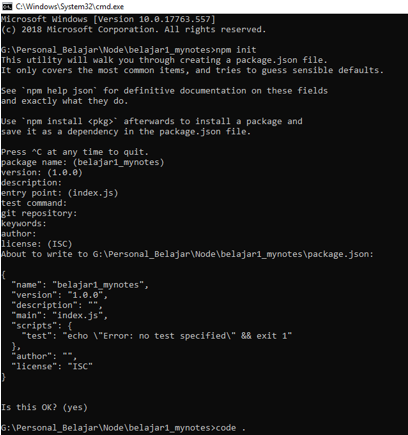 |
| npm init |
The use of npm init is mainly just to make dependency file.
Open the project folder using your favourite editor. I recommend you to use Visual studio code.
As we can see, json is now already initiated.
2.Once done, still in the console write
npm install express |
| npm install express |
this code means that we are using npm (node package management) to install node module called 'express'.
What is express in Node ?
What is express in Node ?
Express is designed for building web applications and APIs with NodeJs. So, Express will help us to develop web application.
3. then we write
npm install nodemon |
| npm install nodemon |
What is nodemon module in Node js ?
nodemon is a node module that allow us to run the system continuously. So, if we make a change in the file project, we don't need to restart to run the project. Because nodemon will automatically run it for us. Therefore, it is a very very useful module for developer.
now we can see in the json file that express and nodemon have already installed.
 |
| packae.json in vs code |
Now, we just need to change the start value to
So, every time we start the project, it will automatically start using nodemon.
Okay, it's quite simple right ? Yes it is! (i hope so)
4. Let's install other important modules for the development. We are going to install ejs, mongoose, and dotenv modules. These things are familiar for you ? dont't worry I will explain it all to you.
What is ejs ?
Ejs is the short of Embedded JavaScript templating. EJS is a simple templating language that lets you guys as developers to generate HTML markup with plain JavaScript. Where to put Ejs? as it is a template formatting, we will put in the HTML file but, of course, with a tag like this
I am going to explain it later.
What is mongoose ?
according to www.freecodecamp.org, Mongoose is an Object Data Modeling (ODM) library for MongoDB and Node.js. It manages relationships between data, provides schema validation, and is used to translate between objects in code and the representation of those objects in MongoDB.
So, Mongoose is used only if we are going to use Mongodb database for our application. Where the mongodb module is a library that can enable node js to connect with mongodb.
What is dotnev ?
Dotenv is a zero-dependency module that loads environment variables from a .env file into process.env. So, dotnev will help us to secure our data which is needed for developing web applications like API_key, database password and database username.
Now lets install it
you can install like this
or one by one like this
Ok, I think it is enough for this article, in the next article we are going to create the real Simple CRUD Using Node js, Express, Mongodb and Bootstrap For Beginner (Part 4).
Tag :
Creating Simple CRUD Using Node js, Express, Mongodb and Bootstrap For Beginner, Creating Simple CRUD Using Node js, Express, Mongodb and Bootstrap For Beginner, Creating Simple CRUD Using Node js, Express, Mongodb and Bootstrap For Beginner, Creating Simple CRUD Using Node js, Express, Mongodb and Bootstrap For Beginner, Creating Simple CRUD Using Node js, Express, Mongodb and Bootstrap For Beginner, Creating Simple CRUD Using Node js, Express, Mongodb and Bootstrap For Beginner, Creating Simple CRUD Using Node js, Express, Mongodb and Bootstrap For Beginner, Creating Simple CRUD Using Node js, Creating Simple CRUD Using Node js, Express, Mongodb and Bootstrap For Beginner, Creating Simple CRUD Using Node js, Express, Mongodb and Bootstrap For Beginner, Express, Mongodb and Bootstrap For Beginner
So, every time we start the project, it will automatically start using nodemon.
"start": "nodemon app.js"Okay, it's quite simple right ? Yes it is! (i hope so)
4. Let's install other important modules for the development. We are going to install ejs, mongoose, and dotenv modules. These things are familiar for you ? dont't worry I will explain it all to you.
What is ejs ?
Ejs is the short of Embedded JavaScript templating. EJS is a simple templating language that lets you guys as developers to generate HTML markup with plain JavaScript. Where to put Ejs? as it is a template formatting, we will put in the HTML file but, of course, with a tag like this
<% html_script %>I am going to explain it later.
What is mongoose ?
according to www.freecodecamp.org, Mongoose is an Object Data Modeling (ODM) library for MongoDB and Node.js. It manages relationships between data, provides schema validation, and is used to translate between objects in code and the representation of those objects in MongoDB.
So, Mongoose is used only if we are going to use Mongodb database for our application. Where the mongodb module is a library that can enable node js to connect with mongodb.
What is dotnev ?
Dotenv is a zero-dependency module that loads environment variables from a .env file into process.env. So, dotnev will help us to secure our data which is needed for developing web applications like API_key, database password and database username.
Now lets install it
you can install like this
npm install dotnev mongoose ejsor one by one like this
npm install dotnevnpm install mongoosenpm install ejsOk, I think it is enough for this article, in the next article we are going to create the real Simple CRUD Using Node js, Express, Mongodb and Bootstrap For Beginner (Part 4).
Table Content
| title | Link |
|---|---|
| Creating Simple CRUD Using Node js, Express, Mongodb and Bootstrap Part 1 | Link |
| Creating Simple CRUD Using Node js, Express, Mongodb and Bootstrap Part 2 | Link |
| Creating Simple CRUD Using Node js, Express, Mongodb and Bootstrap Part 3 | Link |
| Creating Simple CRUD Using Node js, Express, Mongodb and Bootstrap Part 4 | Link |
| Creating Simple CRUD Using Node js, Express, Mongodb and Bootstrap Part 5 | Link |
| Creating Simple CRUD Using Node js, Express, Mongodb and Bootstrap Part 6 | Link |
| Creating Simple CRUD Using Node js, Express, Mongodb and Bootstrap Part 7 | Link |
Tag :
Creating Simple CRUD Using Node js, Express, Mongodb and Bootstrap For Beginner, Creating Simple CRUD Using Node js, Express, Mongodb and Bootstrap For Beginner, Creating Simple CRUD Using Node js, Express, Mongodb and Bootstrap For Beginner, Creating Simple CRUD Using Node js, Express, Mongodb and Bootstrap For Beginner, Creating Simple CRUD Using Node js, Express, Mongodb and Bootstrap For Beginner, Creating Simple CRUD Using Node js, Express, Mongodb and Bootstrap For Beginner, Creating Simple CRUD Using Node js, Express, Mongodb and Bootstrap For Beginner, Creating Simple CRUD Using Node js, Creating Simple CRUD Using Node js, Express, Mongodb and Bootstrap For Beginner, Creating Simple CRUD Using Node js, Express, Mongodb and Bootstrap For Beginner, Express, Mongodb and Bootstrap For Beginner